Meta File System (MFS)
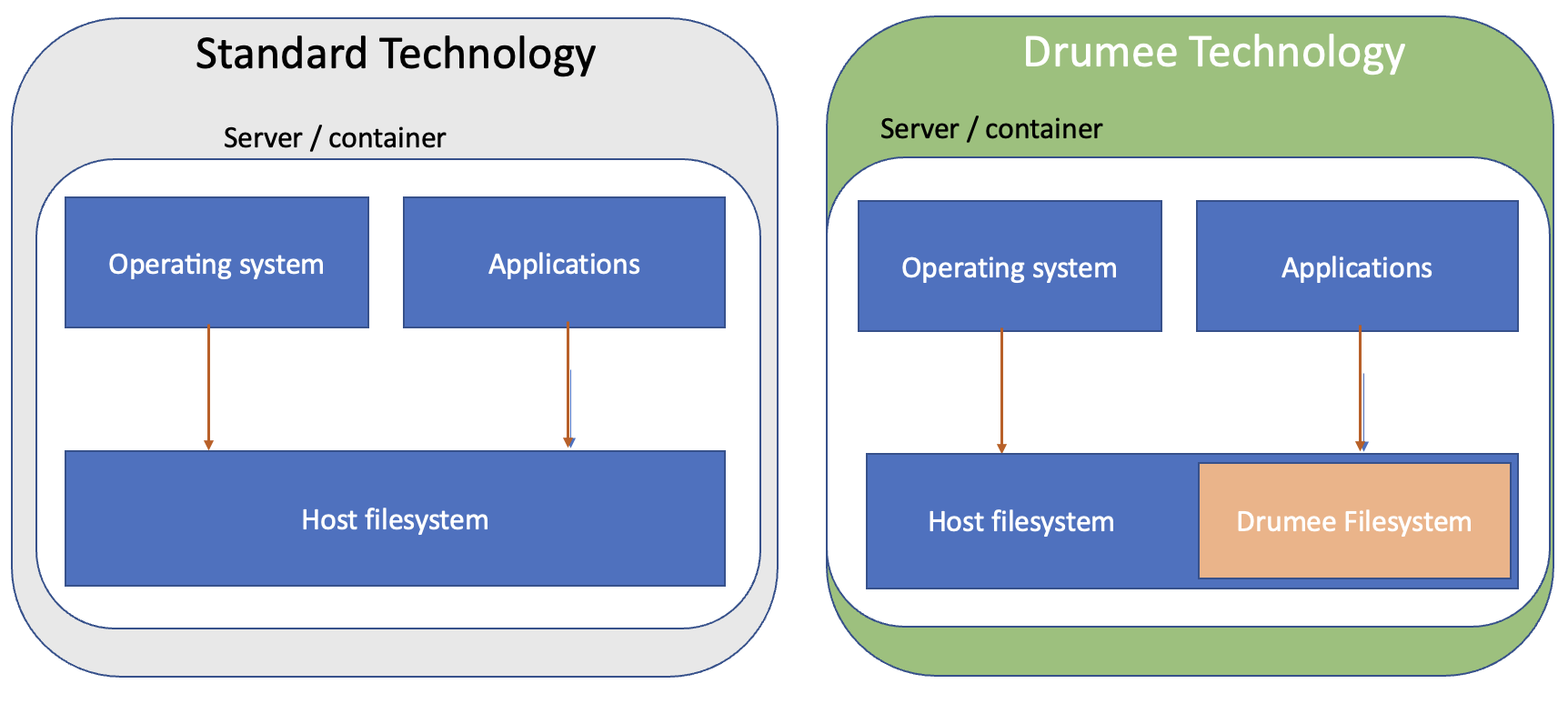
MFS, for Meta File System, is Drumee's internal file management layer. Unlike standard web applications that expose the host file system directly to application logic, MFS adds a full abstraction layer that makes file handling safer, more flexible, and permission-aware at every level.
Why MFS Exists
Standard applications that work directly with the host file system face several structural problems:
- The entire host file system is potentially reachable if the application has a vulnerability
- There is no built-in concept of ownership or per-user isolation
- Moving, copying, or trashing files requires writing custom logic in every service
- No unified way to attach metadata (MIME type, category, visibility) to files
MFS solves all of these by storing the logical representation of files and folders in a database and keeping physical files in an isolated, content-addressed storage directory. The application never constructs raw filesystem paths from user input.
Core Concepts
Nodes
Everything in MFS is a node. A node can be:
| Category | Description |
|---|---|
folder | A directory that contains other nodes |
file | An uploaded file (document, image, video, etc.) |
hub | A special root folder that belongs to a Hub (shared workspace) |
Each node has a unique id (UUID), an owner_id, a parent_id pointing to its container, and a set of metadata fields including filename, mimetype, category, filesize, and extension.
Physical Storage
Physical files live under a content-addressed path:
{mfs_dir}/{VFS_ROOT_NODE}/{node_id}/
The application never exposes this path to the client. Downloads and uploads go through MFS service endpoints that perform permission checks before any I/O.
The Media Table
The central database table is media. Every node in every hub and every personal drive is a row in a media table. Each Hub and each user has its own database, so the media table is scoped per owner. Cross-hub queries use Drumee's stored procedure convention of prefixing the database name.
Key columns:
| Column | Description |
|---|---|
id | UUID — primary key and physical storage address |
parent_id | UUID of the parent folder node |
owner_id | UUID of the owning user |
filename | Internal filename |
user_filename | Display name shown to users |
mimetype | MIME type of the file |
category | Logical type: folder, file, hub, etc. |
filesize | Size in bytes |
extension | File extension without the dot |
metadata | JSON blob for arbitrary additional data |
show | Visibility flag |
ctime | Creation Unix timestamp |
mtime | Last modification Unix timestamp |
Trash System
Deleted nodes are not immediately removed. They are moved to a trash_media table with a trashed_time timestamp. This allows users to restore files within a configurable expiry window. Once the expiry period passes, the expiry worker permanently deletes the physical files and purges the database record.
Key Stored Procedures
MFS operations are performed exclusively through stored procedures. Services never run raw SQL against the media table directly.
| Procedure | Purpose |
|---|---|
mfs_create_node | Create a new file or folder node |
mfs_move | Move a node to a different parent |
mfs_copy | Copy a node and its children |
mfs_trash_media | Soft-delete: move node to trash |
mfs_restore | Restore a node from trash |
mfs_purge | Hard-delete a node record |
mfs_empty_trash | Permanently delete all expired trash nodes |
mfs_manifest | Get the full recursive file list under a node |
mfs_access_node | Check whether a user can access a given node |
mfs_get_by | Fetch a node record by various criteria |
Permission Model
Every MFS node carries a permission level. Drumee uses a bitwise permission system:
| Level | Value | Who |
|---|---|---|
anonymous | 0 | Public, no authentication |
read | 2 | Any authenticated user with read access |
write | 4 | Users with write access |
admin | 6 | Hub administrators |
owner | 7 | The node owner |
The permission_grant procedure assigns a privilege level to a specific entity (user, group, or wildcard *) on a node for a defined duration. The permission_revoke procedure removes it.
Service Layer Integration
MFS services receive a resolved node via this.granted_node() or this.source_granted(). These methods perform the ACL check and return the node object only if the current user has sufficient privilege. A service never needs to check permissions manually — the ACL configuration in the JSON file handles the gate, and granted_node() provides the already-verified result.
Example service pattern:
async move() {
  const node = this.granted_node();      // permission already checked
  const pid  = this.input.need('pid');   // required: destination folder id
  await this.db.await_proc('mfs_move', node.id, pid);
  this.output.data({ nid: node.id });
}
SEO Integration
When a file is created or modified, Drumee can register it in the seo_index and seo_register tables. This enables the platform's internal search engine to index documents without exposing file paths directly. The SEO indexing pipeline runs asynchronously and does not block file operations.
Related Topics
- ACL System — How permissions are enforced at the service level
- Backend SDK — mfs — MFS service API reference
- Backend SDK — media — Media service API reference
- Backend SDK — trash — Trash expiry configuration